Magnolia Watercolor Digital Paper Pack
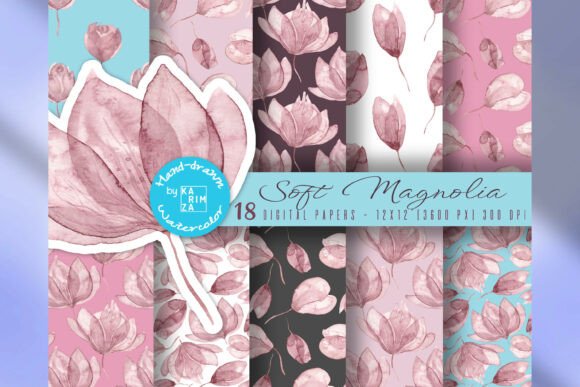
The Magnolia Watercolor Digital Paper Pack is a versatile collection of seamless digital papers featuring hand-painted watercolor magnolia flowers and petals. Designed with soft, dusty pink tones, this pack offers an elegant and romantic aesthetic that fits seamlessly into various creative projects. Whether you're working on stationery, fabric design, or digital backgrounds, these papers provide a cohesive and professional look.
Each paper in the pack is 12x12 inches at 3600x3600 pixels with a high resolution of 300 DPI. The files are in JPG format, making them easy to use across different platforms and software. The seamless repeating patterns allow for continuous designs without visible edges, ideal for background elements or large-scale prints.
How to Use the Magnolia Watercolor Digital Paper Pack
The Magnolia Watercolor Digital Paper Pack can be integrated into your workflow at multiple stages. Before starting a project, use these papers as inspiration for color schemes, layout ideas, or texture references. During the creative process, they serve as a foundation for layering elements, adding depth, or creating visual interest. After completing a project, they can be used for final touches, such as background overlays or texture additions.
For example, if you're designing wedding invitations, start by selecting a paper from the pack as a base. Use it to create a soft, floral backdrop that complements the text and other design elements. During the layout phase, overlay typography and graphics on top of the paper to ensure visual harmony. Once the design is complete, export the final file with the paper as part of the background for a polished look.
Integration with Other Tools and Resources
The Magnolia Watercolor Digital Paper Pack works well with a variety of design tools and resources. When using graphic design software like Adobe Photoshop or Illustrator, import the papers as layers to experiment with blending modes, opacity settings, and color adjustments. For digital artists, these papers can act as a canvas or texture layer, enhancing the overall composition of a piece.
In addition, the pack can be paired with other digital assets such as fonts, icons, or illustrations. For instance, when creating printable paper crafts, combine the magnolia papers with custom illustrations or decorative elements to add a cohesive theme. This integration ensures that all components of a project maintain a consistent visual style.
Practical Implementation Tips
To make the most of the Magnolia Watercolor Digital Paper Pack, organize your files systematically. Create a dedicated folder for the papers and label them based on their intended use, such as "Wedding Stationery" or "Fabric Design." This organization helps streamline your workflow and makes it easier to locate specific papers when needed.
When working with seamless patterns, ensure that your design software is set to the correct resolution and dimensions. This prevents any scaling issues or pixelation when exporting the final file. Additionally, test the papers in different contexts to see how they interact with other design elements. For example, print a small sample to check the color accuracy and texture before applying it to a larger project.
Use Cases and Workflow Examples
The versatility of the Magnolia Watercolor Digital Paper Pack makes it suitable for a wide range of applications. For scrapbooking, use the papers as background pages or decorative elements to enhance the visual appeal of your albums. When creating sublimation projects, apply the papers to fabric or other materials to achieve a soft, artistic finish.
In the context of planner stickers, select a paper from the pack and cut out individual magnolia elements to use as embellishments. These can be layered with other stickers or handwritten notes to add a personal touch. For digital backgrounds, use the papers as a base for website headers, social media posts, or email newsletters to create a visually engaging experience.
Factors to Consider for Long-Term Use
When incorporating the Magnolia Watercolor Digital Paper Pack into your long-term workflow, consider factors such as compatibility, usability, and quality control. Ensure that the papers are compatible with your preferred design software and that they maintain their quality when scaled or edited. Regularly review your files to update or replace any outdated elements.
Additionally, maintain a backup of the original files to prevent data loss. Store them in a secure location, such as an external drive or cloud storage, so you can access them whenever needed. By prioritizing these factors, you can ensure that the papers remain a valuable resource in your creative process.
Commercial Use and Licensing
The Magnolia Watercolor Digital Paper Pack allows for commercial use, making it a great asset for small businesses and entrepreneurs. Whether you're creating products for sale or offering design services, the pack provides a professional and elegant look that can elevate your brand. Always review the licensing terms to ensure compliance with any specific requirements.
When using the papers for commercial purposes, maintain consistency in your branding by selecting papers that align with your overall aesthetic. This consistency helps build recognition and trust with your audience. Additionally, consider how the papers can be adapted to different product types, such as printed materials, digital downloads, or merchandise.
Conclusion
The Magnolia Watercolor Digital Paper Pack is a valuable tool for designers, crafters, and small business owners looking to add a touch of elegance and romance to their projects. With its seamless patterns, soft color palette, and high-resolution files, it offers a flexible solution for a variety of creative applications. By integrating these papers into your workflow, you can enhance the visual appeal of your designs while maintaining a cohesive and professional look.